以風險管理的角度來看,將所有的投資標的(instruments)依所曝露的風險分為4種,equity(權益證券/股票、對應的衍生商品), FI(fixed income,含票、債券、對應的衍生商品), FX(外匯、對應的衍生商品), commodity(金、油、穀等商品、對應的衍生商品)。FX和commodity若排除otc商品的話是最單純的(歷史匯價下載可參考 http://www.quantshare.com/sa-421-6-places-to-download-historical-intraday-forex-quotes-data-for-free ),FI如果單就國庫券、國債來說還算單純,所以上述標的中最複雜的就是equity,但是各國政府通常會規定公司必需定期揭露財報資訊,而交易所會提供報價(通常要收錢)及財報。
免費的歷史報價可參考 http://www.quantshare.com/sa-426-6-ways-to-download-free-intraday-and-tick-data-for-the-us-stock-market
財報目前多可下載xbrl檔案,sec的網頁上有edgar專門放置這些資料 http://www.sec.gov/edgar.shtml
開源的xbrl專案 http://arelle.org/download/
另外nasdaq有類似的網頁,以蘋果為例:http://www.nasdaq.com/symbol/aapl/financials?query=balance-sheet
而總經的數據,以台灣為例,由主計處及勞委會、央行分別製作權責內的報告,目前匯總於
http://ebas1.ebas.gov.tw/pxweb/Dialog/statfile9L.asp
2012年7月23日 星期一

2012年7月4日 星期三
机率与统计书单(四)
抽空重新看了一下chung的Elementary Probability Theory,發現223頁談到這個stirling formula真的滿有趣的。回顧一下,它是對n!的一個近似式,在沒有計算機的時代,這提供了相當大的計算便利。學統計時一定會發現一件很突兀的事,就是卡方(chi-square)的引入,等效來說,就是gamma函數的引入;但是如果能了解stirling近似的必要性,就會發現,這是很自然而方便的擴展。可參考
http://en.wikipedia.org/wiki/Stirling's_approximation
http://episte.math.ntu.edu.tw/articles/mm/mm_17_2_05/page4.html
224頁導出二項分配最中間出像的機率,225頁繼續推導固定半徑下累計出像的機率,與上述連結之推導有同步進展的意味。226頁則將p擴展到1/2以外的情況,並且開始偷渡了常態標準值的觀念進去,228頁導出二項分配在固定區間內的累積機率,至此為常態分布舖路的工作告一段落。
http://en.wikipedia.org/wiki/Stirling's_approximation
http://episte.math.ntu.edu.tw/articles/mm/mm_17_2_05/page4.html
224頁導出二項分配最中間出像的機率,225頁繼續推導固定半徑下累計出像的機率,與上述連結之推導有同步進展的意味。226頁則將p擴展到1/2以外的情況,並且開始偷渡了常態標準值的觀念進去,228頁導出二項分配在固定區間內的累積機率,至此為常態分布舖路的工作告一段落。
2012年5月4日 星期五
DIY乒乓球"發球機"(II)
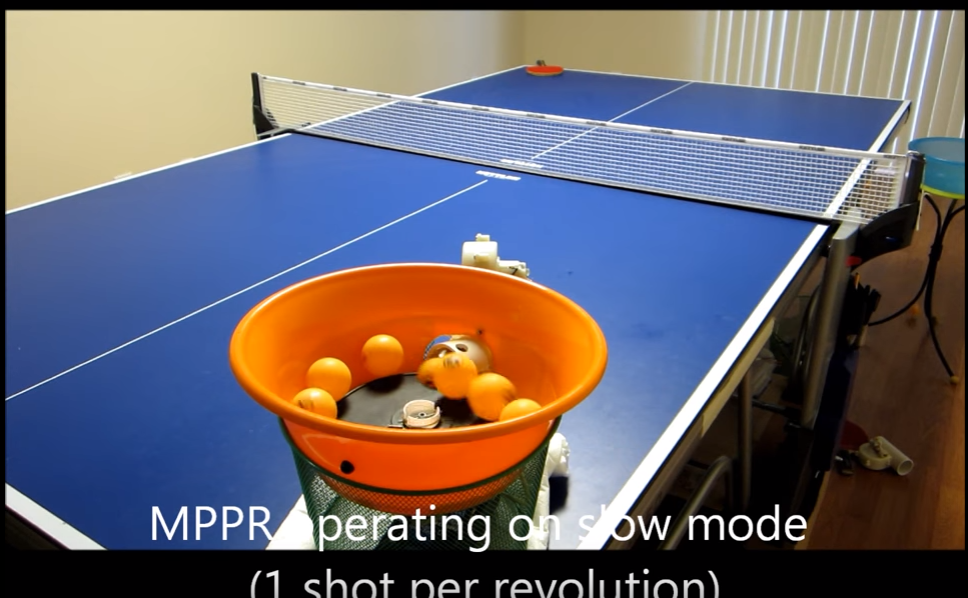
https://www.youtube.com/watch?v=4vV8vnnen_s 完成度很高
http://www.youtube.com/watch?v=qqoDK7DrOIM 這個機構很簡潔,我喜歡
http://blog.yahoo.com/_DD2XVJGTMIMLMFCIKM47DFDMPQ/articles/280468 稍微交代了一下材料
http://www.youtube.com/watch?v=omy7j2sD1aE 商品化的產品,叫做iPong...XD
2011年5月18日 星期三
製作安裝WIN7的USB棒方法
http://www.umpcfever.com/viewthread.php?tid=4409
win7的工具還滿好用的,可以說是一步到位了
另外格式化的動作可使用內建工具,可參考 http://maketecheasier.com/boot-and-install-windows-7-from-usb-flash-drive/2009/01/23
win7的工具還滿好用的,可以說是一步到位了
另外格式化的動作可使用內建工具,可參考 http://maketecheasier.com/boot-and-install-windows-7-from-usb-flash-drive/2009/01/23
2011年4月2日 星期六
DIY乒乓球"發球機"
http://www.ttfriends.com/forum/dv_rss.asp?s=xhtml&boardid=243&id=193536&page=1&star=1&count=55
http://www.ttfriends.com/forum/dv_rss.asp?s=xhtml&boardid=243&id=309964&page=1
以上出自此論壇 http://www.ttfriends.com/forum/dv_rss.asp?s=xhtml&boardid=243&page=1
http://bbs.xmfish.com/read.php?tid=1727046&page=1 簡易版
http://tw.myblog.yahoo.com/jw!QGlpu4eGCBzCnRY7pwA-/article?mid=985&prev=993&next=972 圖多
http://www.zuojiaju.com/thread-32327-1-1.html 還能改變方向和角度
http://www.youtube.com/watch?v=HIMtHxMLO58&NR=1 home made?不太相信…
http://www.youtube.com/watch?v=bjAHljq24rk&NR=1 機動學作業現在都要這樣搞啦~~
http://www.youtube.com/watch?v=hSh2F42pXZI 上面那個影片的完整版…不愧是GITECH,不用電的
http://www.ttfriends.com/forum/dv_rss.asp?s=xhtml&boardid=243&id=309964&page=1
以上出自此論壇 http://www.ttfriends.com/forum/dv_rss.asp?s=xhtml&boardid=243&page=1
http://bbs.xmfish.com/read.php?tid=1727046&page=1 簡易版
http://tw.myblog.yahoo.com/jw!QGlpu4eGCBzCnRY7pwA-/article?mid=985&prev=993&next=972 圖多
http://www.zuojiaju.com/thread-32327-1-1.html 還能改變方向和角度
http://www.youtube.com/watch?v=HIMtHxMLO58&NR=1 home made?不太相信…
http://www.youtube.com/watch?v=bjAHljq24rk&NR=1 機動學作業現在都要這樣搞啦~~
http://www.youtube.com/watch?v=hSh2F42pXZI 上面那個影片的完整版…不愧是GITECH,不用電的
2011年1月25日 星期二
擷取PDF檔內圖片
使用軟體的話,有以下工具
http://opensecrets.pixnet.net/blog/post/27841494
http://azo-freeware.blogspot.com/2008/08/some-pdf-image-extract-14.html
使用手寫程式的話,如果是jpg檔,以這個python script而言很簡單
http://nedbatchelder.com/blog/200712/extracting_jpgs_from_pdfs.html
否則就要參考一些資料了
http://stackoverflow.com/questions/2693820/extract-images-from-pdf-without-resampling-in-python
http://www.jpedal.org/PDFblog/2010/04/understanding-the-pdf-file-format-how-are-images-stored/
這也證實了,如果不是單純的jpg圖檔的話,"擷取PDF檔內圖片"這件工作可能會很麻煩
涉及中文的話,可參考以下連結
http://ccckmit.wikidot.com/pdf:streamcoding
原版的pdf規格
http://partners.adobe.com/public/developer/en/pdf/PDFReference16.pdf
簡明的pdf檔格式的說明:
http://www.mactech.com/articles/mactech/Vol.15/15.09/PDFIntro/
節錄其中重點如下
http://opensecrets.pixnet.net/blog/post/27841494
http://azo-freeware.blogspot.com/2008/08/some-pdf-image-extract-14.html
使用linux/perl的話,參考下列連結
http://nedbatchelder.com/blog/200712/extracting_jpgs_from_pdfs.html
否則就要參考一些資料了
http://stackoverflow.com/questions/2693820/extract-images-from-pdf-without-resampling-in-python
http://www.jpedal.org/PDFblog/2010/04/understanding-the-pdf-file-format-how-are-images-stored/
這也證實了,如果不是單純的jpg圖檔的話,"擷取PDF檔內圖片"這件工作可能會很麻煩
涉及中文的話,可參考以下連結
http://ccckmit.wikidot.com/pdf:streamcoding
原版的pdf規格
http://partners.adobe.com/public/developer/en/pdf/PDFReference16.pdf
簡明的pdf檔格式的說明:
http://www.mactech.com/articles/mactech/Vol.15/15.09/PDFIntro/
節錄其中重點如下
b  closepath, fill,and stroke path.
B  fill and stroke path.
b*  closepath, eofill,and stroke path.
B*  eofill and stroke path.
BI  begin image.
BMC  begin marked content.
BT  begin text object.
BX  begin section allowing undefined operators.
c  curveto.
cm  concat. Concatenates the matrix to the current transform.
cs  setcolorspace for fill.
CS  setcolorspace for stroke.
d  setdash.
Do  execute the named XObject.
DP  mark a place in the content stream, with a dictionary.
EI  end image.
EMC  end marked content.
ET  end text object.
EX  end section that allows undefined operators.
f  fill path.
f*  eofill Even/odd fill path.
g  setgray (fill).
G  setgray (stroke).
gs  set parameters in the extended graphics state.
h  closepath.
i setflat.
ID  begin image data.
j  setlinejoin.
J  setlinecap.
k  setcmykcolor (fill).
K  setcmykcolor (stroke).
l  lineto.
m  moveto.
M  setmiterlimit.
n  end path without fill or stroke.
q  save graphics state.
Q  restore graphics state.
re  rectangle.
rg  setrgbcolor (fill).
RG  setrgbcolor (stroke).
s  closepath and stroke path.
S  stroke path.
sc  setcolor (fill).
SC  setcolor (stroke).
sh  shfill (shaded fill).
Tc  set character spacing.
Td  move text current point.
TD  move text current point and set leading.
Tf  set font name and size.
Tj  show text.
TJ  show text, allowing individual character positioning.
TL  set leading.
Tm  set text matrix.
Tr  set text rendering mode.
Ts  set super/subscripting text rise.
Tw set word spacing.
Tz  set horizontal scaling.
T*  move to start of next line.
v  curveto.
w  setlinewidth.
W  clip.
y  curveto.

TABLE 1: PDF Page Markup Operators
(Note: Equivalent PostScript operators are in boldface.)
2011年1月24日 星期一
訂閱:
文章 (Atom)


